> ## Documentation Index
> Fetch the complete documentation index at: https://tyk-dx-2353-aggregate-pump-doc-caveat.mintlify.site/llms.txt
> Use this file to discover all available pages before exploring further.
# Promote APIs, Keys and Policies Between Environments
> Learn how to promote APIs, keys and policies between Tyk environments, such as Development, Staging and Production
## Introduction
It is possible with the Multi-Cloud and the Self-Managed version of Tyk to manage multiple environments across data centers. This can be very useful if you have QA, UAT and Production environments that are physically or geographically separate and you want to move API configurations between environments seamlessly.
This page explains how to promote APIs, keys and policies from one environment to another. If you instead want to segment a single Tyk cluster into zones, so that specific Gateways selectively load specific APIs, see [Gateway and API Sharding](/api-management/api-sharding).
## Move APIs Between Environments
It is possible to move APIs between Tyk environments in the following ways:
### In Shared Dashboard Environments
If the environments are both Self-Managed installations and are sharing a Tyk Dashboard (and optionally an MDCB instance) then you can use API and Gateway tagging to transparently and effortlessly move an API from one environment to another.
See [API Tagging](/api-management/api-sharding#api-tagging-with-on-premises) for more details.
#### API Sharding
You can also use [API Sharding](/api-management/api-sharding#what-is-api-sharding-) to move APIs in a Shards (and or MDCB) Tyk Self-Managed installation.
### In Separate Dashboard Environments
If the API dashboards are separate and you wish to migrate API Definitions between two completely segregated environments (e.g. migrating to new hardware or a new DC), then you can use the Export functionality of the Dashboard to download the API definition as JSON and import it into your new installation.
#### Steps for Configuration:
1. **Select Your API**
From the **API Designer**, select your API:
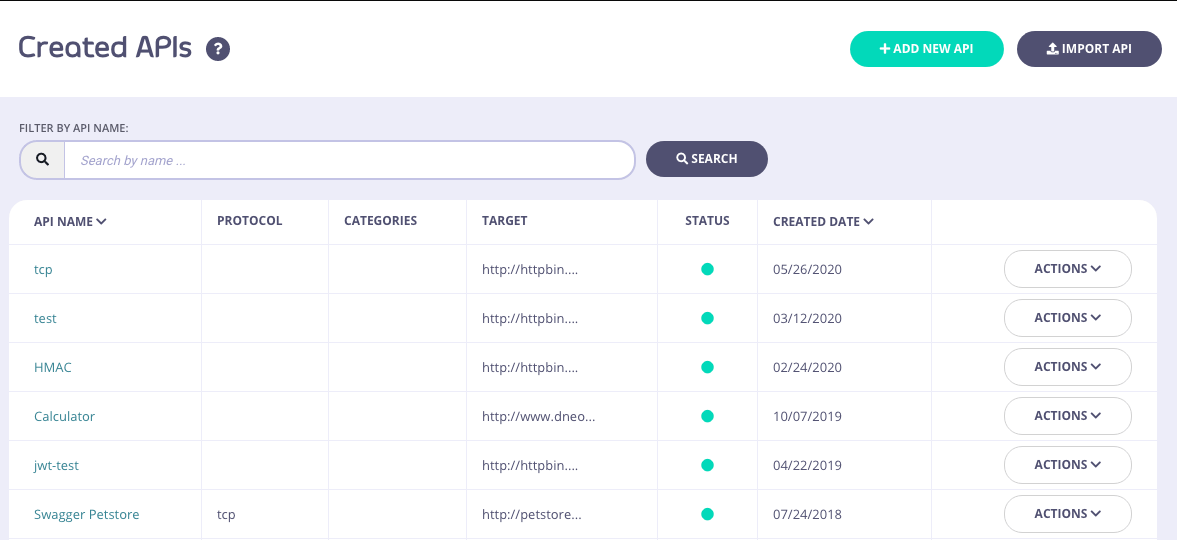 2. **Export the API**
Click **EXPORT**:
2. **Export the API**
Click **EXPORT**:
 3. **Save the API**
Save and rename the JSON file:
4. **Import into your New Environment**
In your new environment, click **IMPORT API**:
3. **Save the API**
Save and rename the JSON file:
4. **Import into your New Environment**
In your new environment, click **IMPORT API**:
 5. **Generate the new API**
Select the **From Tyk Definition** tab and paste the contents of the JSON file into the code editor and click **GENERATE API**:
5. **Generate the new API**
Select the **From Tyk Definition** tab and paste the contents of the JSON file into the code editor and click **GENERATE API**:
 This will now import the API Definition into your new environment, if you have kept the API ID in the JSON document as is, the ID will remain the same.
The ID you use in with any Dashboard API integrations will change as the documents physical ID will have changed with the import.
### Use Tyk-Sync
You can also use our new Tyk-Sync tool which allows you to sync your APIs (and Policies) with a Version Control System (VCS). You can then move your APIs between environments. See [Tyk-Sync](/api-management/automations/sync) for more details.
## Move Keys Between Environments
Tyk currently does not have a facility to export a group of keys from one environment and reissue them in another and still be able to manage those keys from within the Dashboard.
However, it is possible to temporarily allow access to existing keys in a new environment, but it should be noted that these keys should eventually be expired and re-generated within the new environment.
### Moving Keys Between Environments / Creating Custom Keys
In order to use a legacy key in a new environment, simply extract the key from the old environment using the Tyk REST APIs and then create them in the new environment using the custom key creation API.
To create a key with a custom identifier, ie Token, simply use the [Gateway (OSS)](/tyk-gateway-api) or [Dashboard (Pro)](https://tyk.io/docs/api-reference/keys/create-custom-key) REST APIs to import a custom key.
## Move Policies Between Environments
Moving policies between two (Dashboard) environments is not as easy as moving API definitions and requires working with the Dashboard API to first retrieve the policies, and then modifying the document to reinsert them in your new environment:
### Preparation
First you must set up your new environment to respect explicit policy IDs. To do so, edit the `tyk.conf` and `tyk_analytics.conf` files in your new environment and set the `policies. allow_explicit_policy_id` setting to `true` (the setting is just `allow_explicit_policy_id` at the root level of the Dashboard configuration). In order to retain your `api_id` when moving between environments then set `enable_duplicate_slugs` to `true` in your target `tyk_analytics.conf`.
### Steps for Configuration
1. **Get your Policy**
```{.copyWrapper} theme={null}
curl -X GET -H "authorization: {YOUR TOKEN}" \
-s \
-H "Content-Type: application/json" \
https://admin.cloud.tyk.io/api/portal/policies/{POLICY-ID} | python -mjson.tool > policy.json
```
2. **Edit the file we just created**
The original file will look something like this, notice the two ID fields:
```{.json} theme={null}
{
"_id": "5777ecdb0a91ff0001000003",
"access_rights": {
"xxxxx": {
"allowed_urls": [],
"api_id": "xxxxx",
"api_name": "Test",
"versions": [
"Default"
]
}
},
"active": true,
"date_created": "0001-01-01T00:00:00Z",
"hmac_enabled": false,
"id": "",
"is_inactive": false,
"key_expires_in": 0,
"name": "Test Policy",
"org_id": "xxxxx",
"partitions": {
"acl": false,
"quota": false,
"rate_limit": false
},
"per": 60,
"quota_max": -1,
"quota_renewal_rate": 60,
"rate": 1000,
"tags": []
}
```
3. **Move the id field value**
Remove the `_id` field and put the value of the `_id` field into the `id` field, so `policy.json` should look like this:
```{.json} theme={null}
{
"access_rights": {
"xxxxx": {
"allowed_urls": [],
"api_id": "xxxxx",
"api_name": "Test",
"versions": [
"Default"
]
}
},
"active": true,
"date_created": "0001-01-01T00:00:00Z",
"hmac_enabled": false,
"id": "5777ecdb0a91ff0001000003", <------ NEW ID FIELD
"is_inactive": false,
"key_expires_in": 0,
"name": "Test Policy",
"org_id": "xxxxx",
"partitions": {
"acl": false,
"quota": false,
"rate_limit": false
},
"per": 60,
"quota_max": -1,
"quota_renewal_rate": 60,
"rate": 1000,
"tags": []
}
```
4. **Update the policy via the API**
Save the new `policies.json` file and then let's POST it back to the new environment:
```{.copyWrapper} theme={null}
curl -X POST -H "authorization: {API-TOKEN}" \
-s \
-H "Content-Type: application/json" \
-d @policies.json \
https://{YOUR-NEW-ENV}/api/portal/policies | python -mjson.tool
```
That's it, Tyk will now load this policy, and you will be able to manage and edit it the same way in your new environment, if you are re-creating tokens in your new environment, then those tokens' ACL does not need to be changed to a new policy ID since the legacy one will always be used as the reference for the policy.
#### Policy IDs in the Dashboard
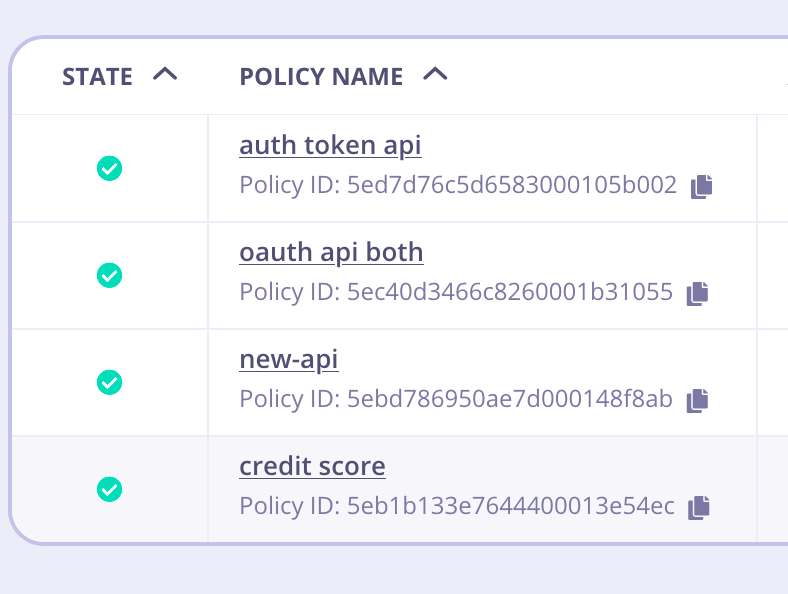
After migrating a Policy from one environment to another, it is important to note that the **displayed** Policy ID is not going to match. **That is okay**. It happens because Tyk Dashboard displays the [`Mongo ObjectId`](https://docs.mongodb.com/manual/reference/glossary/#term-id), which is the `_id` field, but the `id` is the important part.
**For example:**
Policies in source environment
This will now import the API Definition into your new environment, if you have kept the API ID in the JSON document as is, the ID will remain the same.
The ID you use in with any Dashboard API integrations will change as the documents physical ID will have changed with the import.
### Use Tyk-Sync
You can also use our new Tyk-Sync tool which allows you to sync your APIs (and Policies) with a Version Control System (VCS). You can then move your APIs between environments. See [Tyk-Sync](/api-management/automations/sync) for more details.
## Move Keys Between Environments
Tyk currently does not have a facility to export a group of keys from one environment and reissue them in another and still be able to manage those keys from within the Dashboard.
However, it is possible to temporarily allow access to existing keys in a new environment, but it should be noted that these keys should eventually be expired and re-generated within the new environment.
### Moving Keys Between Environments / Creating Custom Keys
In order to use a legacy key in a new environment, simply extract the key from the old environment using the Tyk REST APIs and then create them in the new environment using the custom key creation API.
To create a key with a custom identifier, ie Token, simply use the [Gateway (OSS)](/tyk-gateway-api) or [Dashboard (Pro)](https://tyk.io/docs/api-reference/keys/create-custom-key) REST APIs to import a custom key.
## Move Policies Between Environments
Moving policies between two (Dashboard) environments is not as easy as moving API definitions and requires working with the Dashboard API to first retrieve the policies, and then modifying the document to reinsert them in your new environment:
### Preparation
First you must set up your new environment to respect explicit policy IDs. To do so, edit the `tyk.conf` and `tyk_analytics.conf` files in your new environment and set the `policies. allow_explicit_policy_id` setting to `true` (the setting is just `allow_explicit_policy_id` at the root level of the Dashboard configuration). In order to retain your `api_id` when moving between environments then set `enable_duplicate_slugs` to `true` in your target `tyk_analytics.conf`.
### Steps for Configuration
1. **Get your Policy**
```{.copyWrapper} theme={null}
curl -X GET -H "authorization: {YOUR TOKEN}" \
-s \
-H "Content-Type: application/json" \
https://admin.cloud.tyk.io/api/portal/policies/{POLICY-ID} | python -mjson.tool > policy.json
```
2. **Edit the file we just created**
The original file will look something like this, notice the two ID fields:
```{.json} theme={null}
{
"_id": "5777ecdb0a91ff0001000003",
"access_rights": {
"xxxxx": {
"allowed_urls": [],
"api_id": "xxxxx",
"api_name": "Test",
"versions": [
"Default"
]
}
},
"active": true,
"date_created": "0001-01-01T00:00:00Z",
"hmac_enabled": false,
"id": "",
"is_inactive": false,
"key_expires_in": 0,
"name": "Test Policy",
"org_id": "xxxxx",
"partitions": {
"acl": false,
"quota": false,
"rate_limit": false
},
"per": 60,
"quota_max": -1,
"quota_renewal_rate": 60,
"rate": 1000,
"tags": []
}
```
3. **Move the id field value**
Remove the `_id` field and put the value of the `_id` field into the `id` field, so `policy.json` should look like this:
```{.json} theme={null}
{
"access_rights": {
"xxxxx": {
"allowed_urls": [],
"api_id": "xxxxx",
"api_name": "Test",
"versions": [
"Default"
]
}
},
"active": true,
"date_created": "0001-01-01T00:00:00Z",
"hmac_enabled": false,
"id": "5777ecdb0a91ff0001000003", <------ NEW ID FIELD
"is_inactive": false,
"key_expires_in": 0,
"name": "Test Policy",
"org_id": "xxxxx",
"partitions": {
"acl": false,
"quota": false,
"rate_limit": false
},
"per": 60,
"quota_max": -1,
"quota_renewal_rate": 60,
"rate": 1000,
"tags": []
}
```
4. **Update the policy via the API**
Save the new `policies.json` file and then let's POST it back to the new environment:
```{.copyWrapper} theme={null}
curl -X POST -H "authorization: {API-TOKEN}" \
-s \
-H "Content-Type: application/json" \
-d @policies.json \
https://{YOUR-NEW-ENV}/api/portal/policies | python -mjson.tool
```
That's it, Tyk will now load this policy, and you will be able to manage and edit it the same way in your new environment, if you are re-creating tokens in your new environment, then those tokens' ACL does not need to be changed to a new policy ID since the legacy one will always be used as the reference for the policy.
#### Policy IDs in the Dashboard
After migrating a Policy from one environment to another, it is important to note that the **displayed** Policy ID is not going to match. **That is okay**. It happens because Tyk Dashboard displays the [`Mongo ObjectId`](https://docs.mongodb.com/manual/reference/glossary/#term-id), which is the `_id` field, but the `id` is the important part.
**For example:**
Policies in source environment
 Policies in target environment after migration
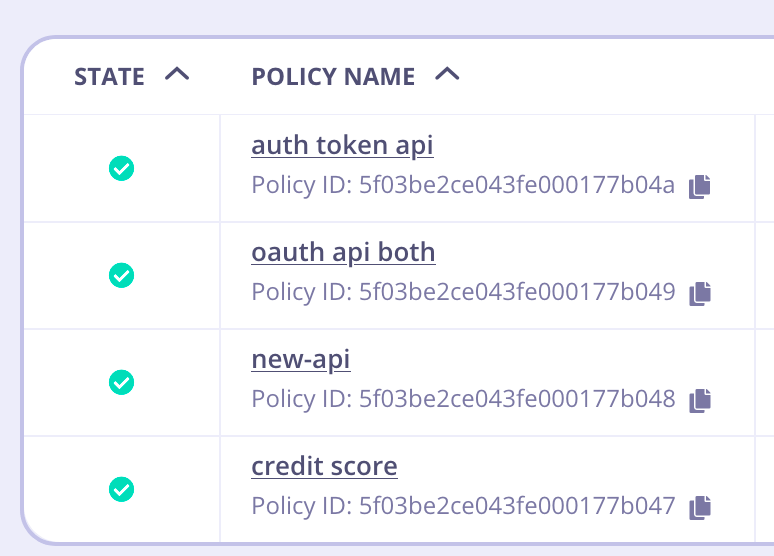 Notice that the IDs appear to be different. These are the BSON IDs and are expected to be different. But if we look for the underlying GUID `id`, you can see it's been mapped properly in the target environment.
```
$ curl dash-host-source/api/portal/policies/
....
"_id": "5eb1b133e7644400013e54ec",
"id": "",
"name": "credit score",
$ curl dash-host-target/api/portal/policies/
....
"_id": "5f03be2ce043fe000177b047",
"id": "5eb1b133e7644400013e54ec",
"name": "credit score",
```
As you can see, under the hood, the policy has been migrated correctly with target Tyk Dashboard saving the proper ID inside `id`. That is the value that will be referred to inside Key Creation, etc.
### Use Tyk-Sync
You can also use our new Tyk-Sync tool which allows you to sync your Policies (and APIs) with a Version Control System (VCS). You can then move your Policies between environments. See [Tyk-Sync](/api-management/automations/sync) for more details.
Notice that the IDs appear to be different. These are the BSON IDs and are expected to be different. But if we look for the underlying GUID `id`, you can see it's been mapped properly in the target environment.
```
$ curl dash-host-source/api/portal/policies/
....
"_id": "5eb1b133e7644400013e54ec",
"id": "",
"name": "credit score",
$ curl dash-host-target/api/portal/policies/
....
"_id": "5f03be2ce043fe000177b047",
"id": "5eb1b133e7644400013e54ec",
"name": "credit score",
```
As you can see, under the hood, the policy has been migrated correctly with target Tyk Dashboard saving the proper ID inside `id`. That is the value that will be referred to inside Key Creation, etc.
### Use Tyk-Sync
You can also use our new Tyk-Sync tool which allows you to sync your Policies (and APIs) with a Version Control System (VCS). You can then move your Policies between environments. See [Tyk-Sync](/api-management/automations/sync) for more details.